An eco solvent printer for small business is a practical investment when your company has recurring demand for vinyl stickers, window graphics, banners, wall graphics, vehicle decals, display media, or other roll-fed sign products. The right machine can bring outsourced work in-house, shorten delivery times, improve control over color and revisions, and open new services. The wrong machine can create the opposite result: idle equipment, clogged nozzles, slow finishing, inconsistent media profiles, and cash tied up in supplies that do not match your actual orders.
For most small sign and graphics companies, the best starting point is not the fastest or widest printer in a catalog. It is the configuration that covers the jobs customers already request, fits the available workspace, can be maintained by the current team, and leaves enough budget for a cutter, laminator, RIP software, media, ink, ventilation, and working capital. A compact 650 or 1,300 mm system may suit labels, decals, samples, and narrow rolls. A 1,600 to 1,850 mm system is often more flexible for general sign production. A 2,500 or 3,200 mm platform belongs in a different production plan with larger media, more handling space, and stronger order volume.
This guide shows how to make that decision without relying on a vague “best printer” ranking. You will learn which applications fit eco-solvent production, how to compare widths and printheads, how to translate rated speed into sellable output, what equipment must surround the printer, how to estimate ownership cost, and what evidence to request from a supplier. You can also review the current X-Roland eco solvent printer range while using the decision framework below.
Is an Eco Solvent Printer the Right Choice for Your Small Business?
Eco-solvent printing is designed primarily for compatible flexible roll media. The printer jets ink onto coated or ink-receptive material, and controlled heating and airflow help the print dry before winding, finishing, or installation. The technology is established in sign and display production because it can serve a wide mix of indoor and outdoor graphics without requiring a printing plate for each design.
An eco solvent printer for small business use makes sense when the business can turn roll media into finished products repeatedly. That last word matters. Owning a printer creates daily and weekly care requirements even when customer orders are quiet. A company that prints only occasionally may be better served by outsourcing until demand becomes consistent.
Businesses That Are Usually a Good Fit
- Sign shops producing storefront graphics, wayfinding, posters, banners, and event displays.
- Sticker and decal companies that need roll-fed printed vinyl before contour cutting.
- Vehicle graphics businesses producing partial wraps, fleet markings, window decals, and promotional graphics.
- Print service providers that currently outsource wide-format color work and want greater control over lead time.
- Exhibition and event suppliers that manage frequent artwork changes and short deadlines.
- Interior graphics businesses producing wallcoverings, canvas, decorative films, or retail graphics.
- Existing screen-printing, DTF, copy, or design businesses adding sign and display products.
Businesses That Should Pause Before Buying
- A hobby seller with irregular demand and no plan for daily printer care.
- A company that mainly prints directly on rigid boards or three-dimensional objects; a UV flatbed route may be more suitable.
- A garment decorator whose core demand is cotton T-shirts or polyester sportswear; DTF, DTG, or sublimation may fit the product better.
- A shop without safe ventilation, stable power, climate control, media storage, or room for finishing.
- A buyer choosing equipment only because the advertised speed or purchase price looks attractive.
- A business with no local or remote technical capability and no budget for training, parts, and production downtime.
The practical test is simple: list the products you expect to sell every month, the media each product requires, the finished sizes, the acceptable delivery time, and the margin after finishing and installation. If most of that work is compatible roll media, eco-solvent deserves serious consideration. If the list is dominated by garments, rigid products, or occasional craft orders, a different process or continued outsourcing may be the safer choice.
What Can a Small Business Produce With Eco-Solvent Printing?
The value of a printer comes from finished products, not from square meters of printed media. Small businesses should evaluate each application as a complete workflow that includes design, printing, drying, cutting, lamination, mounting, packaging, and installation.
| Application | Typical media | Required finishing | Main buyer concern |
|---|---|---|---|
| Vinyl stickers and labels | Printable self-adhesive vinyl | Contour cutting, weeding, optional lamination | Fine detail, adhesive performance, repeat color |
| Window graphics | Clear, white, perforated, or removable film | Cutting, lamination, application tape, installation | Visibility, removal, viewing side, durability |
| Vehicle decals and graphics | Vehicle-grade adhesive vinyl | Outgassing as required, lamination, cutting, installation | Color consistency, conformability, surface preparation |
| Banners | Compatible flex banner media | Trimming, welding or hemming, eyelets | Readability, strength, delivery speed |
| Posters and display graphics | PP, poster media, coated film | Trimming, mounting, optional lamination | Smooth gradients, small text, presentation quality |
| Backlit displays | Backlit film or compatible lightbox media | Trimming, mounting, lightbox installation | Transmitted color density and uniformity |
| Canvas and wall graphics | Canvas, wallcovering, wall vinyl | Coating or lamination where needed, trimming, installation | Texture, panel matching, cleanable finish |
| Exhibition graphics | Banner, adhesive film, display media | Cutting, mounting, packing | Fast revisions, consistent branding, transport durability |
The X-Roland signage application guide groups these opportunities around retail, events, wayfinding, brand environments, flexible rolls, rigid panels, films, and display surfaces. For a small business, however, the first equipment purchase should usually focus on a narrower product set. A sticker and decal shop needs different finishing capacity from a banner producer. A vehicle graphics company must control lamination and installation, while a wallcovering business must control panel sequence and color consistency across long repeats.
Start with three anchor products that share media and finishing equipment. For example:
- Printed vinyl stickers and labels.
- Storefront and window graphics.
- Small signs, posters, and promotional displays.
This combination can share printable vinyl, a cutter, laminate, color profiles, and installation tools. It is easier to standardize than launching ten unrelated products at once.
How Eco-Solvent Printing Works in a Real Production Workflow
A useful buying guide must go beyond the printer specification. The complete route is what determines output quality and delivery time.
1. Artwork and Preflight
The operator checks dimensions, bleed, cut paths, fonts, linked images, resolution, black construction, and spot colors. Poor files create waste regardless of machine quality. Jobs that require contour cutting also need a reliable relationship between print marks, RIP output, and the cutter.
2. RIP and Color Management
The RIP converts artwork into printable data and controls resolution, pass count, ink limits, media profile, nesting, copies, and other production settings. A correct media profile balances color, drying, image quality, and ink load. Simply choosing the highest resolution does not guarantee the best commercial result.
3. Media Loading and Calibration
The operator loads compatible media, checks alignment and tension, confirms pinch or pressure roller positions, and runs nozzle and calibration checks. Long roll jobs make media feeding, take-up, suction, and heater settings more important than they may appear during a short demonstration.
4. Printing and Drying
The machine prints while platform heating and external drying help stabilize the output. The required drying or waiting time depends on the ink, media, ink coverage, shop conditions, and next finishing step. Do not assume that media can always be laminated immediately because it feels dry on the surface.
5. Finishing
The printed roll may be laminated, contour cut, trimmed, hemmed, welded, mounted, or prepared with application tape. Finishing often becomes the true production bottleneck. A fast printer paired with a slow cutter or manual trimming process will not create fast deliveries.
6. Inspection and Release
The final check should cover dimensions, color against the approved reference, cut alignment, surface defects, lamination, finishing strength, packaging, and installation instructions. Record the media, profile, print mode, finishing settings, and approved result so a repeat order does not begin from zero.
This process explains why buying an eco solvent printer for small business production is really a workflow decision. The machine is central, but the finished product depends on every step around it.
Choose Print Width From Sellable Jobs, Not From Ambition
Print width affects media cost, product range, floor space, handling, finishing equipment, shipping, and the number of jobs that can be nested across a roll. Wider is useful only when the business can sell and handle the additional width.
For a buyer comparing an eco solvent printer for small business use, width should therefore be treated as a product and workflow decision, not as a prestige specification.
| Print-width class | Practical small-business use | Advantages | Tradeoffs |
|---|---|---|---|
| 650 mm | Small decals, labels, samples, narrow media | Compact footprint, lower media commitment, useful for focused work | Limited banner and sign sizes; more tiling or outsourcing |
| 1,300 mm | Decals, posters, transfer paper, display graphics | Broader product range while remaining relatively compact | Still below common 1.6 m sign-shop media width |
| 1,600–1,850 mm | General sign work, banners, wall graphics, vehicle graphics | Flexible media availability and broad commercial application range | More floor space, finishing width, media inventory, and operating discipline |
| 2,500 mm | Wider wallcoverings, banners, specialty rolls | Fewer joins and access to wider jobs | Larger rolls, power, drying, handling, and lower utilization risk |
| 3,200 mm | Large banners, billboards, high-volume wide-format production | Produces wide work with fewer seams and supports industrial-scale jobs | Substantial space, labor, media weight, finishing, logistics, and order-volume requirements |
For many new sign businesses, 1,600 mm is a practical planning benchmark because it serves a broad range of commercial graphics without the infrastructure of a 3,200 mm line. That does not make it universally correct. A label company may earn more from a compact printer used every day than from a wide machine used once a week.
Before choosing, collect at least 30 to 60 days of actual or expected order data. Record finished width, finished length, media, quantity, deadline, outsourced cost, selling price, and required finishing. Count how many jobs genuinely require each width. This evidence is more useful than asking which machine is “best.”
Compare Printheads and Rated Speed With Caution
The current X-Roland range includes configurations using I3200, I1600, and F1080 printheads. Product pages also show single-head, dual-head, and four-head systems. These options create different output tiers, but head count alone does not define suitability.
The correct printhead tier for an eco solvent printer for small business production depends on approved quality, reliable daily volume, maintenance resources, and the cost of downtime.
What Head Count Changes
- Potential production speed when the rest of the system and print mode support it.
- Initial equipment cost and the financial exposure associated with head replacement.
- Ink delivery, carriage, calibration, electronics, and maintenance complexity.
- The amount of work required to keep the machine commercially productive.
Why Rated Speed Is Not Daily Capacity
Supplier-listed speed usually represents a specific pass mode under defined conditions. A real shift also includes file preparation, media loading, nozzle checks, calibration, test strips, job changes, drying, roll changes, finishing, cleaning, and reprints.
Use this planning formula:
Sellable daily output = tested print speed × actual printing hours × utilization factor × first-pass yield
For example, do not insert an arbitrary 80% utilization rate into a business plan. Measure it. Run the customer's typical files and media for a representative period. Record how many square meters entered finishing and how many were approved for sale. A high-speed mode that produces unacceptable banding or insufficient drying has no commercial value.
When evaluating an eco solvent printer for small business, request three samples from the same machine configuration:
- A fast production mode for distance-view graphics.
- A standard sellable mode for everyday work.
- A higher-quality mode for close-view graphics, small text, gradients, and skin tones.
Ask the supplier to state the media, pass count, resolution, print direction, ink, RIP, heater settings, and measured time. That creates a repeatable comparison rather than a collection of attractive sample images.
X-Roland Models That Fit Different Small-Business Stages
The table below uses specifications currently published on X-Roland product pages. Speeds are reference values, not guaranteed shop output. Confirm the exact model, printhead, ink system, RIP package, electrical requirements, and material compatibility in the quotation and sample test.
| Model | Published width | Published configuration | Published reference speed | Best planning use |
|---|---|---|---|---|
| XL-650WX / XL-1300WX | 650 / 1,300 mm | Two I3200 or F1080 heads | I3200: 48 m²/h at 3 pass, 38 at 4 pass; F1080: 24 at 4 pass, 16 at 6 pass | Compact decal, label, display, transfer-paper, and sampling workflows |
| XL-1601H | 1,600 mm | One Epson I3200 head | 23 m²/h at 4 pass, 18 at 6 pass | Entry-level 1.6 m sign production with a broad application width |
| XL-1680S / XL-1850S | 1,680 / 1,850 mm | One I3200, I1600, or F1080 head, depending on configuration | I3200: 24 m²/h at 3 pass, 18 at 4 pass; other head speeds vary | Cost-conscious startups, general graphics, backup capacity, and lower-volume shops |
| XL-1602H / XL-1802H | 1,600 / 1,800 mm | Two heads; model-dependent options | I3200: 42 m²/h at 4 pass, 30 at 6 pass | Growing shops with recurring 1.6–1.8 m work and tighter delivery schedules |
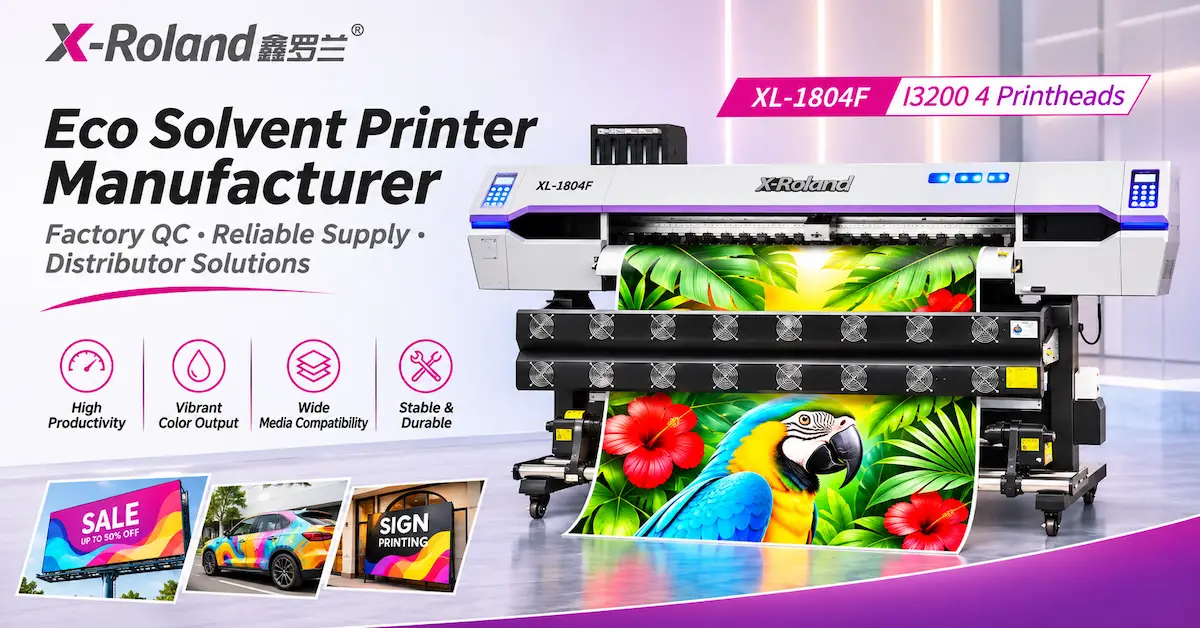
| XL-1804F | 1,850 mm | Four I3200 heads | 97 m²/h at 3 pass, 76 at 4 pass | Established production centers with enough demand and finishing capacity for high output |
| XL-2500Y | 2,500 mm | Two I3200 or F1080 heads | I3200: 45 m²/h at 3 pass, 38 at 4 pass; F1080: 20 at 3 pass, 16 at 4 pass | Businesses expanding into wider wallcoverings, banners, film, and specialty roll work |
The practical small-business comparison is not “single head versus four heads” in isolation. It is “which configuration can our sales volume, operators, cutter, laminator, and cash flow support?” A single-head system that runs consistently at an approved quality mode can be a better first investment than a four-head system waiting for orders.
The model pages also list multiple ink routes on some platforms. Treat water-based, eco-solvent, or UV as configuration choices, not as permission to change ink types casually. Ink systems, tubing, dampers, printheads, profiles, drying, and material compatibility must match the selected configuration.
Materials Determine Whether the Application Works
Media compatibility should be proven with the actual supplier, coating, adhesive, liner, thickness, and finishing process the business intends to use. A generic statement such as “prints vinyl” is not enough.
Every eco solvent printer for small business plan should therefore include a written media list and a sample protocol for the products that will generate revenue.
Self-Adhesive Vinyl
Test print quality, drying, cut performance, liner stability, adhesive behavior, lamination compatibility, removal, and the intended indoor or outdoor exposure. Vehicle work also requires the correct film class, overlaminate, surface preparation, installation skill, and application conditions.
Banner Media
Check feeding, edge curl, heater response, ink density, surface marking, finishing strength, and whether the media is suitable for the intended environment. A banner is a fabricated product; the printed image is only one component.
Backlit and Display Media
Evaluate the print under its final lighting condition. A file that looks acceptable on a bench may appear weak or uneven when illuminated. Ask for a sample with dark areas, gradients, neutrals, fine text, and high ink coverage.
Canvas and Wallcovering
Check texture, cracking, coating response, panel consistency, cleanability, trimming, overlap or butt-join requirements, and installation adhesive. Repeat jobs need documented panel order and color settings.
Clear Film
Confirm how the graphic will be viewed and mounted. Standard CMYK eco-solvent output on clear film does not create opaque white areas. If the product requires white ink or a multilayer optical effect, discuss a different configuration or production method.
A professional supplier should ask about the material before recommending a machine. X-Roland's equipment support and workflow services begin with substrate, target volume, artwork, and the result expected by the end customer, followed by a practical route and sample review.
The Printer Is Only Part of the Investment
Many first-time buyers budget for the machine and starter ink but overlook the equipment that turns a printed roll into a finished order. Build the purchasing plan around the complete cell.
The quoted eco solvent printer for small business price is only one part of that cell, so compare complete workflows rather than isolated machine totals.
Essential Production Components
- A computer that meets the RIP and file-processing requirements.
- Licensed RIP software and a clear process for media profiles and backups.
- A compatible contour cutter if stickers, decals, or shaped graphics are core products.
- A laminator for applications requiring surface protection or installation performance.
- Trimming, measuring, weeding, application-tape, mounting, and packing tools.
- Stable electrical supply, correct grounding, and any recommended voltage protection.
- Ventilation appropriate to the ink, cleaning fluids, room, workload, and local rules.
- Climate control and media storage that limit heat, humidity, dust, and direct sunlight.
- Starter media, ink, cleaning supplies, wipes, waste containers, and approved maintenance items.
- Spare parts selected according to supplier guidance and local service availability.
- Worktables and roll handling that protect operators and media.
Optional Equipment Depends on the Product Mix
A banner business may need welding and eyelet equipment. A vehicle graphics business needs stronger lamination and installation capability. A wallcovering operation needs accurate trimming and panel management. A sticker business may need efficient contour cutting, sheet separation, inspection, and packing more urgently than additional print speed.
Before buying an eco solvent printer for small business operations, draw the floor plan. Show the machine, service clearances, front and rear media movement, computer, ink storage, ventilation, cutter, laminator, worktables, finished-goods area, and safe access. A printer that physically fits but cannot be serviced or loaded properly does not fit the business.
Calculate Total Cost of Ownership Before Comparing Quotes
Purchase price is visible. Operating friction is not. Two quotations can appear similar while including different printheads, RIP licenses, dryers, take-up systems, starter supplies, warranty terms, installation, packaging, freight, and technical support.
A credible eco solvent printer for small business cost comparison must normalize these inclusions before one quotation is called less expensive.
Build a 24-Month Cost Model
Include the following categories:
- Printer and selected configuration.
- RIP and production software.
- Cutter, laminator, dryer, finishing tools, and installation tools.
- Freight, insurance, customs, tax, local delivery, and rigging.
- Electrical, ventilation, climate, network, and workspace preparation.
- Ink, media, laminate, cleaning supplies, waste, and test prints.
- Operator labor, training, design, preflight, finishing, and packing.
- Maintenance parts, service, and planned printhead exposure.
- Downtime, reprints, color correction, and unusable media.
- Working capital for media inventory and customer payment terms.
Use two separate calculations:
Cost per sellable square meter = total production cost for the period ÷ approved sellable square meters
Monthly break-even contribution = monthly fixed ownership cost ÷ contribution margin per sellable square meter
Contribution margin is selling price minus variable production and fulfillment cost. Do not substitute revenue for contribution. Also avoid using the printer's fastest rated speed as the denominator. Base the model on tested sellable output and expected utilization.
An eco solvent printer for small business production is financially attractive when recurring outsourced work, new demand, and faster delivery produce enough contribution to cover ownership cost with a reasonable buffer. It is not attractive simply because the machine price is low.
Plan the Operating Environment and Safety Requirements
“Eco-solvent” does not mean odor-free, risk-free, or suitable for every home environment. Ink and cleaning fluid must be handled according to their current safety data sheets, the machine manual, and local ventilation, electrical, fire, waste, and occupational safety requirements.
Site Questions to Resolve Before Shipment
- Can the packed machine pass through the gate, door, corridor, lift, or loading area?
- Is there enough space for operation, roll loading, take-up, maintenance, and emergency access?
- Does the site have the correct voltage, frequency, circuit capacity, grounding, and power stability?
- Can the room maintain the temperature and humidity range required by the selected model, ink, and media?
- Is ventilation designed for the real room volume and production load?
- Are ink, cleaning fluid, media, waste, and contaminated consumables stored and managed correctly?
- Will dust, fibers, direct sunlight, strong airflow, or static electricity affect the printer or media?
- Is there a safe path between printing, drying, lamination, cutting, packing, and dispatch?
The XL-1680S / XL-1850S page lists a working condition of 18–29°C and 50–80% relative humidity for that product source. Do not apply this value automatically to every machine. Confirm the installation range for the final configuration in its manual and commercial documentation.
Maintenance Is a Production Function, Not an Emergency Task
Small teams often assign maintenance only after a defect appears. That approach increases waste and makes troubleshooting harder. Build care into the production schedule.
Routine care is especially important for an eco solvent printer for small business because one stopped machine can interrupt the company's entire wide-format service line.
| Frequency | Typical control points | Business reason |
|---|---|---|
| Start of day or shift | Environment, ink levels, waste level, nozzle check, media path, visible leaks or alarms | Detect problems before customer media is loaded |
| During production | Drying, take-up, media tracking, nozzle condition, color, surface contact, unusual sound | Prevent a small issue from damaging a long roll |
| End of day or shift | Cleaning and capping procedures specified by the manufacturer, work-area cleanup, job and setting records | Protect the print system and improve repeatability |
| weekly | Wiper and capping area condition, accessible dust and ink residue, rollers, take-up, consumables, backups | Reduce gradual quality loss and unplanned stoppage |
| Monthly or scheduled | Calibration checks, filters or service items as specified, electrical and environmental review, spare-parts status | Keep maintenance planned rather than reactive |
| Before extended shutdown | Manufacturer-approved shutdown procedure and support confirmation | Protect heads and ink delivery during inactivity |
This is a general planning framework, not a substitute for the selected machine manual. Never improvise chemicals, tools, flushing procedures, or printhead contact. Ask the supplier for model-specific daily, weekly, monthly, and shutdown instructions before the equipment arrives.
How to Audit the Supplier and Sample Before You Buy
A high-conversion purchase decision needs evidence. Product images and a speed table are useful, but they do not prove the complete workflow.
Before approving an eco solvent printer for small business, test the same files, media, and quality criteria the team will use for customer orders.
Request a Controlled Sample Test
Send the supplier:
- Your actual artwork rather than only a supplier demonstration file.
- The final dimensions and viewing distance.
- The actual media or a precisely identified equivalent.
- Small text, gradients, neutral gray, solid color, fine lines, photographs, and high ink coverage.
- The required print mode and expected delivery quality.
- Finishing requirements such as lamination, cutting, mounting, or outdoor use.
- The tests you need, such as color comparison, adhesion, scratch, water, or installation review.
Ask the supplier to return the physical sample when possible and document the model, head configuration, ink, media, RIP, profile, pass count, speed setting, heater setting, and finishing method.
Compare the Quotation Line by Line
The quotation should identify:
- Exact model and current revision.
- Printhead model and quantity.
- Ink type and color configuration.
- Effective print width and media handling limit.
- Included heaters, dryer, take-up, alarms, and safety features.
- RIP name, version, license scope, and computer requirements.
- Included accessories, starter consumables, tools, and spare parts.
- Voltage, power, plug, operating environment, machine size, packed size, and weight.
- Production time, packing, shipping term, freight responsibility, and documentation.
- Installation, training, remote support, response route, warranty, exclusions, and parts policy.
Review Manufacturing and Quality Controls
The X-Roland site describes checks covering incoming materials, platform flatness, guide rail and center-axis adjustment, assembly and aging, inspection and corrective action, printhead cable connection, final function testing, and packing and shipment inspection. Read more about the company's factory approach on the X-Roland About page.
Ask for evidence relevant to your unit: factory test output, nozzle check, configuration record, machine photos or video, serial information, packing details, and an agreed acceptance process. Certification claims should be matched to current documents, scope, and product applicability rather than treated as a general logo.
Common Buying Mistakes That Reduce Small-Business ROI
These mistakes appear repeatedly when buyers evaluate an eco solvent printer for small business use. The related guide to choosing an eco solvent printer and avoiding common pitfalls provides additional context for a broader equipment review.
1. Buying the Widest Machine the Budget Allows
Width without demand increases floor-space, roll-handling, media-inventory, and finishing requirements. Choose the narrowest platform that covers the profitable job mix with room for realistic growth.
2. Comparing Only Maximum Speed
Compare sellable modes using the same artwork, media, and quality target. Include setup, drying, finishing, and reprints.
3. Ignoring the Cutter and Laminator
Stickers, decals, vehicle graphics, and many signs are not finished when printing stops. Balance the production cell so finishing does not become the permanent queue.
4. Treating Every Vinyl as Equivalent
Coating, adhesive, liner, thickness, finish, application surface, durability, and laminate compatibility change the outcome. Approve exact materials.
5. Assuming Eco-Solvent Means No Ventilation
Use safety data, supplier requirements, production volume, room design, and local rules to determine ventilation and handling. Do not use the word “eco” as a safety assessment.
6. Planning With Revenue Instead of Contribution Margin
Revenue does not pay back equipment by itself. Deduct ink, media, laminate, labor, finishing, packaging, delivery, waste, service, and sales cost.
7. Buying Without a Maintenance Owner
Assign responsibility, schedule care, keep records, and define the support contact before production begins.
8. Accepting a Generic Demonstration Sample
A supplier-designed sample may not expose the challenges in your customer files. Test your media, colors, small text, gradients, and finishing.
9. Leaving Configuration Details Outside the Contract
Model names can cover different heads, inks, voltages, accessories, or software. Write the complete configuration into the quotation and order.
10. Assuming the Printer Will Create Demand
Equipment fulfills demand; it does not replace product positioning, sales, pricing, design capability, customer service, or installation quality. Build a sales plan before the machine arrives.
A Step-by-Step Selection Process for a First or Next Printer
Use the following process to select an eco solvent printer for small business growth without skipping commercial and technical controls.
Step 1: Define the Three Main Products
Name the finished products, typical size, media, monthly volume, quality expectation, finishing, selling price, and deadline. Avoid a list that simply says “all advertising products.”
Step 2: Analyze Current Orders
Review completed, lost, and outsourced jobs. Identify the width, material, quantity, turnaround, outsourcing cost, and reason work was lost or delayed.
Step 3: Set the Required Width
Choose width from real jobs and available media. Include nesting and finishing, but do not pay for width with no forecasted use.
Step 4: Set Three Quality Modes
Define distance-view, standard commercial, and close-view expectations. Request samples and measured output for each relevant mode.
Step 5: Design the Complete Workflow
Select the RIP, computer, cutter, laminator, worktables, ventilation, electrical work, media storage, and staffing. Map the movement of rolls and finished jobs.
Step 6: Build the Cost and Capacity Model
Calculate tested sellable output, variable cost, monthly fixed ownership cost, contribution margin, and break-even volume. Run conservative, expected, and high-demand scenarios.
Step 7: Audit the Supplier
Confirm factory identity, product documentation, quality controls, configuration, support route, parts, warranty, packing, and international delivery responsibilities.
Step 8: Approve the Sample and Specification
Do not rely on verbal descriptions. Attach the approved configuration, sample requirement, acceptance items, and service scope to the commercial agreement.
Step 9: Prepare the Site and Team
Complete power, ventilation, network, space, material storage, software, staffing, and training before arrival.
Step 10: Measure the First 90 Days
Track sellable square meters, ink and media consumption, waste, reprints, maintenance time, finishing time, downtime, on-time delivery, and contribution by product. Use this evidence to refine profiles, pricing, product mix, and the next capacity decision.
When Should a Small Business Move From One Head to Two or Four?
Upgrade because a measured bottleneck justifies it, not because a higher specification feels more professional.
A move from a single-head to a dual-head system may be justified when the existing printer runs near practical capacity in approved modes, profitable work is delayed or outsourced, the finishing department can absorb more output, and cash flow can support higher maintenance exposure. A four-head system requires a stronger case: recurring volume, operators, media handling, finishing capacity, spare-parts planning, and a sales pipeline that can keep the machine productive.
Before upgrading, check whether the bottleneck is actually printing. Slow preflight, poor profiles, frequent nozzle recovery, manual trimming, insufficient lamination, or weak scheduling can make a faster printer appear necessary when workflow control is the real issue.
The best eco solvent printer for small business growth is therefore stage-dependent:
- Focused entry stage: compact or single-head production aligned with a small product range.
- Established local stage: 1.6–1.8 m dual-head capacity for recurring sign and graphics demand.
- Production stage: multi-head or wider equipment supported by measured volume and finishing.
- Diversification stage: a separate UV, DTF, DTG, sublimation, or digital press route when the new product cannot be served well by eco-solvent technology.
You can compare the broader X-Roland product portfolio when the next growth opportunity involves rigid media, apparel, textiles, labels, or other specialty work.
Why Factory Support Matters More to a Small Team
Large production companies may employ dedicated technicians, color specialists, and maintenance staff. A small business often expects one or two people to sell, design, operate, finish, pack, and troubleshoot. That makes clear supplier support commercially important.
X-Roland is operated by Guangzhou Jihui Electronic Equipment Co., Ltd., which states that it was founded in 2013 and integrates research and development, manufacturing, and sales. The company's published support process covers substrate review, color and registration checks, operator setup, packaging and dispatch guidance, repeat-order documentation, and after-sales response.
Do not convert those statements into assumptions about a particular order. Confirm what is included for the selected model and destination. Ask whether commissioning is remote or on-site, which time zone supports the machine, who performs installation, how operator training is delivered, which language is available, what diagnostic evidence is required, and how parts are shipped.
For an OEM or distributor project, the company FAQ states that branding, selected appearance details, configuration, accessory bundles, manuals, or packaging may be reviewed. Feasibility, minimum quantity, validation, cost, and schedule remain project-specific. A small end user normally benefits more from a proven standard configuration than from unnecessary customization.
Is an Eco Solvent Printer Worth It for a Small Business?
It is worth considering when the company has recurring compatible work, knows how the finished products will be sold, can operate the equipment consistently, and can achieve break-even from realistic contribution rather than optimistic revenue. It is not worth buying merely to avoid paying an outside printer if order volume is too low to support maintenance, labor, space, and finishing.
Use this decision rule:
Proceed to sample testing and quotation comparison if all six conditions are true:
- At least three recurring products fit compatible roll media.
- The required width is supported by enough monthly jobs.
- The team can maintain the machine and finish the output.
- The site can meet electrical, ventilation, environmental, and access requirements.
- A conservative break-even model works after all costs and waste.
- The supplier can document the exact configuration, sample result, training, warranty, and support route.
Continue outsourcing or choose another technology if one or more critical conditions remain unresolved. Delaying the purchase until demand and workflow are clear is a valid business decision.
Frequently Asked Questions
What Is the Best Eco Solvent Printer for Small Business Use?
The best machine is the one that covers the company's profitable media widths and quality requirements at a tested production rate while fitting its space, maintenance ability, finishing capacity, and cash flow. A compact system may be best for focused decals and labels. A 1.6 m single-head system may fit a new general sign shop. A dual-head platform may fit a growing shop with recurring volume. There is no responsible universal answer without application and workload data.
How Much Does an Eco Solvent Printer for Small Business Cost?
The machine price depends on width, head model and quantity, ink system, dryer, take-up, RIP, accessories, shipping, installation, and service. The relevant number is the complete installed workflow cost plus 24 months of operation, not the printer price alone. Request a line-item quotation and build a total-cost model before comparing suppliers.
Can I Use an Eco-Solvent Printer in a Home or Apartment?
Do not decide from the word “eco.” Review the current ink and cleaning-fluid safety data, machine requirements, production volume, ventilation design, electrical supply, fire and waste rules, landlord restrictions, and local occupational requirements. A commercial workspace may be more appropriate when ventilation, media handling, finishing, or regular production cannot be managed safely at home.
Is Eco-Solvent Good for Waterproof and Outdoor Stickers?
Eco-solvent is widely used for outdoor graphics, but final durability depends on the complete construction: ink, vinyl, adhesive, laminate, surface, exposure, installation, cleaning, and edge conditions. Test the exact combination and avoid promising a universal outdoor life from the printer alone.
Do I Need a Cutter and Laminator?
A cutter is important for contour-cut stickers, decals, lettering, and shaped graphics. A laminator is important when the application requires additional abrasion, handling, cleaning, UV, or installation protection. Not every poster or short-term display requires lamination, so specify finishing by product instead of applying one rule to every job.
Is I3200 Better Than F1080 for a Small Print Shop?
The X-Roland pages publish different speeds for I3200, I1600, and F1080 configurations. A head should not be selected from one speed number. Compare the exact machine configuration, approved print modes, sample quality, head and parts availability, maintenance, ink compatibility, replacement exposure, and supplier support.
How Much Space Does a 1.6 m Eco-Solvent Printer Need?
Use the machine and packing dimensions from the final specification, then add space for roll loading, take-up, service access, the RIP workstation, ventilation, ink and media storage, cutter, laminator, worktable, packing, and safe movement. Also verify the complete delivery path from the vehicle to the installation position.
How Often Must an Eco-Solvent Printer Run?
Follow the manufacturer's operating and shutdown instructions. The correct routine depends on the machine, ink, environment, workload, and downtime period. Small businesses should assume that regular inspection and maintenance continue even during quiet sales periods and should ask for a written shutdown procedure before purchase.
Can One Printer Use Eco-Solvent, Water-Based, and UV Ink?
Treat these as separate configurations unless the manufacturer explicitly documents a validated conversion. The ink delivery system, materials, printhead compatibility, profiles, drying or curing, and maintenance procedures must match the ink. Do not change ink chemistry based only on a brochure listing several options.
What Information Should I Send to Get an Accurate Recommendation?
Send the finished product, material, maximum width, artwork, expected monthly volume, required delivery time, color and durability requirements, finishing process, destination, electrical supply, available space, current workflow, and desired support. Photos, sample files, and actual media make the recommendation more useful. The X-Roland FAQ explains the information used to prepare a practical equipment proposal.
Get a Recommendation Based on Your Actual Jobs
Choosing an eco solvent printer for small business production should end with a controlled sample and a complete commercial specification, not with a generic model recommendation. Prepare three representative files, identify the exact media, record the maximum width and monthly volume, and list the finishing equipment already available. Then ask the supplier to recommend a configuration and explain why it fits.
When contacting X-Roland, include:
- The products you plan to sell.
- The exact or representative media.
- Maximum print width and typical job size.
- Expected daily or monthly volume.
- Required color, detail, durability, and viewing distance.
- Cutter, laminator, and other finishing equipment already owned.
- Available power, ventilation, temperature control, and floor space.
- Destination country and target delivery timing.
- Installation, training, warranty, and spare-parts expectations.
- Artwork and material for sample testing.
Use the X-Roland contact form to send the brief. A useful inquiry does not need to be long. Material, size, application, volume, and destination give the technical team enough information to ask the right next questions and recommend a production route that can be tested before you invest.