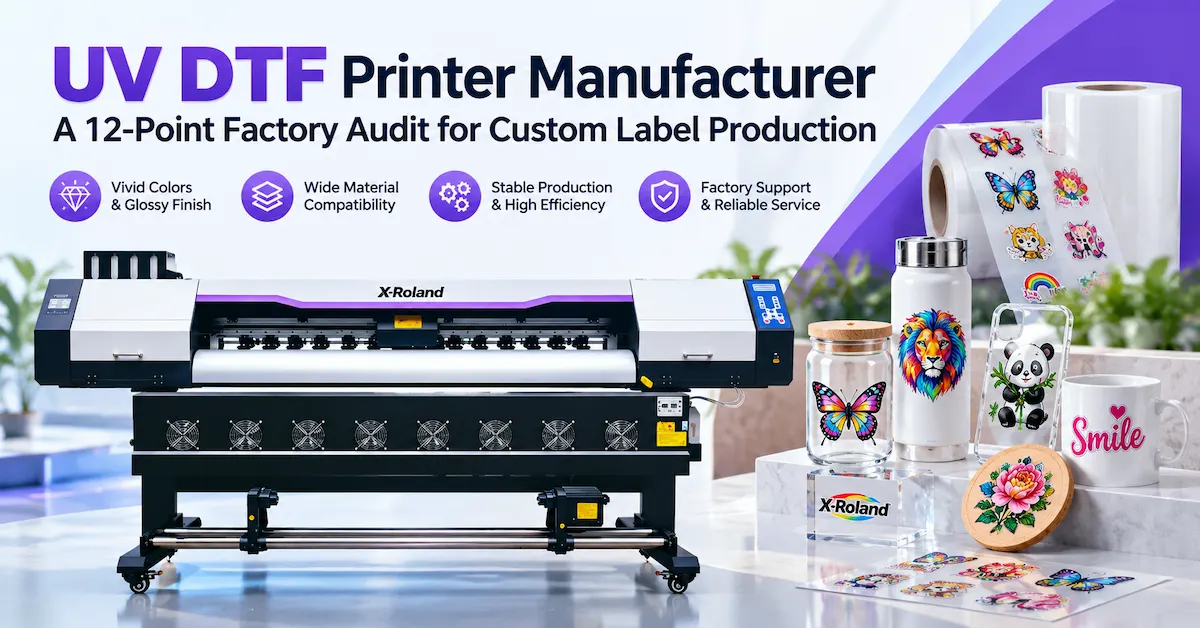
Choosing a UV DTF printer manufacturer is not simply about finding the lowest machine quotation. For businesses producing custom decals, promotional products, glassware branding, or short-run labels, the better choice is a supplier that can demonstrate repeatable transfer quality, a compatible ink-and-film workflow, documented quality checks, and a practical support plan.
The short answer: Ask manufacturers to print your artwork on their proposed equipment, apply the transfers to your actual products, and document accepted output—not just advertised print speed. Verify who assembles and tests the machine, how consumables are specified, which spare parts are available, and what happens after installation. These checks help turn a machinery purchase into a production decision.
This guide provides a 12-point factory audit, a sample-approval method, and a quotation checklist for print shops, promotional-product decorators, branded-goods producers, and equipment distributors.
How Does UV DTF Printing Work, and Who Is It For?
UV direct-to-film (UV DTF) printing produces a decorated graphic on specialized film before transferring it to an item. In a common A/B-film workflow, a UV printer creates the image on the printable film with appropriate color, white, and optional gloss layers. A compatible transfer film is laminated over the graphic, and the finished transfer is positioned on a clean target surface. The carrier is then removed according to the film supplier's instructions. Film construction and processing steps differ between systems, so always follow the confirmed workflow for the selected configuration. Mimaki's published UJV300DTF-75 technical overview also describes a two-film transfer process; that industry example is not a compatibility claim for any other machine.
This method is particularly relevant when it is difficult or uneconomical to feed individual objects through a direct-printing machine. Typical opportunities include branded gift boxes, cosmetic packaging components, bottles, glass accessories, acrylic gifts, coated metal merchandise, and customized promotional products.
It is not a universal print-on-anything process. The coating, texture, surface energy, curvature, cleaning method, and intended use can all change transfer adhesion. Standard UV DTF transfers also should not be confused with garment DTF transfers, which use a different ink, adhesive, and heat-transfer workflow. If most jobs involve flat rigid panels and direct printing is preferable, compare the UV flatbed printer category before committing to film transfer equipment.
The 12-Point Audit for a UV DTF Printer Manufacturer
A dependable UV DTF printer manufacturer should be able to provide evidence for the following checkpoints. Treat unsupported promises as questions to investigate—not as proof of product performance.
1. Verify the company behind the machine
Ask for the registered company name, factory address, production scope, and photos or a live video of assembly and testing. Find out which parts are designed, assembled, inspected, or sourced externally. A company can be a legitimate equipment supplier without manufacturing every component, but its responsibilities should be clear. Review its company and manufacturing information and confirm that the commercial entity matches your quotation.
2. Demand application-specific printed samples
A supplier's showroom decals may look impressive without proving suitability for your work. Send your own logo, fine text, gradients, white details, and repeat-pattern artwork. Request samples printed using the quoted configuration and the intended production settings. Evaluate edge definition, registration, color consistency, visible banding, gloss uniformity, and transfer completeness rather than judging a photograph alone.
3. Test adhesion on the actual substrate
Glass, glazed ceramics, coated metal, acrylic, ABS, polypropylene, and polyethylene do not behave identically. Surface energy matters: 3M's technical guide Categorizing Surface Energy identifies low-surface-energy plastics such as PP and PE as challenging to bond. That principle is relevant to transfer selection, although it does not predict the performance of any particular UV DTF film. Test the proposed transfer on the customer's finished item, including its coating and cleaning process.
4. Inspect the printhead and ink-delivery design
Request the exact printhead model, channel configuration, compatible ink specification, and recommended maintenance schedule. Ask how the system handles white-ink circulation or agitation, nozzle checks, cleaning, waste ink, and idle periods. Printhead branding alone cannot establish machine reliability; ink compatibility, waveform configuration, maintenance access, and operator training also matter.
5. Confirm the white and varnish workflow
White layers can improve opacity on dark products, while gloss or varnish effects can create a dimensional finish when supported by the equipment and ink set. Ask whether these channels are included, optional, or unavailable on the quotation. Check layer alignment and cured-film flexibility. A raised effect that cracks on your target object's curve is not an acceptable premium finish.
6. Evaluate A/B film feeding and lamination
Ask whether the proposed system uses separate or integrated lamination, which film constructions are qualified, and how tension, tracking, pressure, and roller alignment are controlled. Request a demonstration of a complete run from loading film to finished transfers. Wrinkles, bubbles, unstable feeding, and incomplete carrier release can undermine otherwise good printing.
7. Review UV curing and operator safety
Verify the UV-curing arrangement, the printer enclosure or safeguards, ventilation requirements, and the ink manufacturer's Safety Data Sheet. Require operating instructions for ink handling, cleaning chemicals, waste management, and lamp-related hazards. Never assume UV-curable ink is automatically harmless or that a completed transfer is approved for direct food contact, toys, or skin-contact applications without relevant testing and documentation.
8. Compare usable output, not headline speed
Manufacturers may quote printing area per hour, linear speed, or a best-case mode. Your business earns revenue from accepted transfers. Ask for output measured with your typical artwork, print mode, white and varnish layers, film layout, curing, lamination, cutting, inspection, and rework included. A higher headline speed is not useful when finishing losses or setup time erase the advantage.
9. Examine repeatability and factory QC
Request records of machine alignment, calibration, sample approval, stability testing, and final inspection. Watch the same design run more than once and compare early, middle, and final output. A good factory can explain what it checks, how defects are corrected, and which acceptance criteria are recorded before dispatch—not merely say every machine is tested.
10. Verify software, profiles, and training
Confirm which RIP software and license are supplied, the supported file types, color and white-layer setup, workflow language, installation requirements, and profile availability. Ask for operator training materials covering startup, daily checks, nozzle issues, print alignment, lamination, and shutdown. Software costs and updates should appear in the commercial proposal when applicable.
11. Check spare parts and after-sales arrangements
Request a written list of consumables and critical spares, plus information about troubleshooting channels, service hours, response expectations, warranty exclusions, and replacement procedures. Ask what happens if a printhead, UV component, pump, sensor, or laminator part fails after delivery. Define remote support and any on-site service separately; neither should be assumed without agreement.
12. Compare the complete commercial offer
A transparent quotation should identify the exact machine configuration, included accessories, software, initial ink and film, packing, delivery basis, lead time, and payment terms. If you are a distributor, ask whether OEM/ODM labeling, documentation, or configuration is available for the proposed order. Request model-specific conformity documents where your import market requires them; a general factory certificate is not a substitute for product-specific compliance.
Technical Specifications: What Should Be in the Quotation?
Before comparing equipment prices, ask each supplier for a specification sheet using the same fields. The table below is a buyer verification checklist, not a claim that every feature is available on every X-Roland model.
| Specification | What to verify | Why it matters |
|---|---|---|
| Printing width and media size | Usable width, roll or sheet format | Determines layout and order capacity |
| Printhead configuration | Exact model, number, channels | Affects service, workflow and print modes |
| Ink system | CMYK, white, gloss/varnish options | Determines opacity and finish possibilities |
| Film system | Qualified A/B films and suppliers | Reduces compatibility and release problems |
| Lamination | Integrated or separate; settings | Influences labor, alignment and waste |
| UV curing | Compatible ink/lamp settings and safeguards | Supports controlled curing and safe operation |
| Output benchmark | Accepted transfers/hour under agreed conditions | More useful than advertised maximum speed |
| Software | RIP, license, profiles, computer requirements | Prevents unexpected setup costs |
| Maintenance | Consumables, cleaning and spare parts | Defines downtime and recurring expense |
| Delivery | Packing, lead time, trade terms, documents | Clarifies landed cost and receiving plan |
A professional UV DTF printer manufacturer should welcome this comparison because it makes the quotation more precise for both sides.
How to Approve a UV DTF Printer Sample Before Paying a Deposit
Before paying a deposit to a UV DTF printer manufacturer, a repeatable acceptance plan is more valuable than a collection of attractive photos. Use the following five-stage method as a starting point, then agree on project-specific pass/fail criteria with your supplier.
Stage 1 — Define the job. Share final artwork, decal dimensions, expected order volume, substrate specifications, product coating, and where the decorated product will be used.
Stage 2 — Print with the proposed setup. Request the machine configuration, film brand or specification, ink system, print mode, layer settings, and elapsed production time used for the sample.
Stage 3 — Apply to representative products. Test a flat item and any required curved or textured version. Document surface cleaning, application pressure, transfer behavior, and edge lifting.
Stage 4 — Check durability under real conditions. Evaluate handling, rubbing, moisture, cleaning agents, temperature changes, or storage conditions that match the product's use. Use an agreed test method and observation period; do not treat an informal water splash as certification for washing or outdoor durability.
Stage 5 — Record acceptance and repeatability. Compare the results against a signed sample or agreed reference. Record rejects, causes of rework, consumables used, and the number of usable transfers achieved. Keep this information with the order documents.
How Much Does a UV DTF Printer Really Cost to Operate?
The purchase price quoted by a UV DTF printer manufacturer is only one part of the decision. For a UV DTF printing business, estimate the cost per accepted transfer, not just ink cost per square meter:
Cost per accepted transfer = (ink + A/B films + cleaning consumables + labor + electricity + maintenance allowance + allocated equipment cost + scrap/rework) ÷ number of accepted transfers.
Include freight, import charges, installation, and operator training in the investment estimate where relevant. Model your own order mix: a small personalized logo, a detailed multicolor transfer, and a large varnished graphic may consume different amounts of ink, film, and finishing time. An honest supplier will clarify which expenses are known, estimated, or excluded.
For capacity planning, calculate accepted transfers per production hour during a representative run. This captures the practical effects of nesting efficiency, setup changes, lamination, curing, rejected sheets, and operator time. Compare that figure against monthly orders and the margin per finished job before deciding on a machine size or printhead count.
UV DTF, UV Flatbed, or Garment DTF: Which Process Fits Your Orders?
| Technology | Strongest fit | Important limitation |
|---|---|---|
| UV DTF transfer | Short-run branding on qualifying finished hard goods and some curved objects | Requires compatible film/adhesive and application testing |
| Direct UV flatbed | Printing directly onto suitable rigid, flat or fixtured objects | The object must fit and be held accurately in the printer |
| Garment DTF | Apparel decoration using its own transfer and heat-press process | Not the same process or consumables as UV DTF |
For premium transfer appearance, see X-Roland's existing overview of crystal UV transfer stickers. That decorative finish should still be evaluated separately from machine performance and production yield.
What Should an International Buyer Send in the First RFQ?
A useful request for quotation identifies your end product, not only a target price. Tell the UV DTF printer manufacturer what you need to produce and where the machine will operate:
-
Finished products: for example, promotional bottles, cosmetic containers, acrylic gifts, or industrial branding labels.
-
Materials and coatings: glass, painted aluminum, coated plastic, or specific grades of polymer.
-
Artwork: sizes, smallest text, number of colors, transparency, white or varnish requirements.
-
Production target: accepted decals per day, working hours, number of design changes.
-
Business requirements: destination country, preferred shipping terms, available space, electricity, operator experience, and requested OEM/ODM scope.
This information helps the manufacturer propose a realistic setup and identify tests needed before quotation approval.
Why Discuss Your Project With X-Roland?
X-Roland is associated with Guangzhou Jihui Electronic Equipment Co., Ltd., a Guangzhou-based business founded in 2013 that publicly describes its work in printing-equipment R&D, manufacturing, and sales. Its website includes a dedicated UV DTF printer solutions category and explains a factory-focused approach covering material review, print calibration, production checkpoints, inspection, and shipment preparation.
The X-Roland service process starts with the substrate, target volume, artwork, and desired finish, then moves through equipment recommendations, sample reviews, and rollout support. This application-first discussion is useful when a distributor or print shop needs to compare a UV DTF configuration against its actual jobs.
To request a project-specific recommendation, contact the X-Roland team with your substrate details, sample artwork, expected production volume, and delivery market. Confirm current models, technical specifications, software, availability, warranty, and OEM/ODM terms in the formal quotation.
Frequently Asked Questions
1. How can I verify a UV DTF printer manufacturer rather than a trading intermediary?
Check its legal identity and physical operations, request evidence of assembly and final testing, and ask who is accountable for technical troubleshooting and spare parts. A trading company can still provide a good service, but buyers should know who manufactures, configures, warrants, and supports the equipment.
2. What products are commonly decorated with UV DTF transfers?
Typical projects include promotional bottles, giftware, glass accessories, cosmetic packaging components, acrylic items, and branded hard goods. Suitability depends on the actual surface, adhesive, artwork, and conditions of use. Obtain a transfer sample for the exact finished product rather than relying on a general material list.
3. Can a UV DTF printer produce transfers for cotton T-shirts?
Conventional UV DTF is mainly a hard-surface decoration method. Cotton T-shirt production generally calls for a garment-printing workflow such as apparel DTF or DTG. Those systems use different consumables and processing steps; equipment names alone should not be treated as interchangeable.
4. Are UV DTF decals waterproof or dishwasher-safe?
Do not assume either claim. Water resistance, detergent exposure, heat, abrasion, and adhesion depend on the complete ink-film-substrate combination. Require relevant test reports if a product will be washed, cleaned frequently, or used outdoors. Food-contact claims require separate application-specific compliance evidence.
5. Is a higher printhead count always better?
No. More printheads can increase potential throughput, but finished output also depends on print modes, film feeding, white and gloss layers, lamination, curing, maintenance, and rejects. Compare accepted transfers per hour under a test agreed with the supplier.
6. Do I need white ink and varnish for UV DTF labels?
White ink can improve coverage on dark or transparent items. Varnish may support gloss or raised effects when the printer and ink system are configured for it. Your decision should depend on the visual sample, target surface, cost, and required flexibility rather than an assumption that all projects need every layer.
7. How should I evaluate A/B film compatibility?
Ask the supplier to identify qualified film types and to demonstrate printing, lamination, carrier release, and adhesion on your target items. Record storage conditions and approved operating settings. A film that prints well may still perform poorly during transfer or subsequent product handling.
8. What affects UV DTF printer running costs most?
Costs depend on ink and film consumption, accepted yield, printhead and maintenance expenses, labor, lamination, power, and equipment utilization. Request a sample-based cost calculation with assumptions stated. A low purchase price may not result in the lowest cost per accepted transfer.
9. What after-sales support should an overseas buyer confirm?
Confirm the warranty scope, diagnostic process, support language and hours, software guidance, spare-part availability, training materials, and any paid services. Ask for these conditions in writing before placing the order. Remote support and on-site service should be priced or described separately.
10. Can I order OEM or ODM UV DTF printing equipment?
OEM/ODM possibilities depend on the supplier, machine configuration, order quantity, and the requested branding or engineering changes. Ask about labeling, documentation, supported components, sample approval, and commercial terms. Do not assume a particular customization is available until it is confirmed in the quotation.
Conclusion
The right UV DTF printer manufacturer should do more than provide a competitive machine price. It should help you verify finished-transfer quality, fit the ink-and-film process to your products, document factory testing, and understand the true cost of production and ongoing support. A 12-point audit plus a real sample-approval process can make the difference between purchasing equipment that looks attractive in a catalog and investing in a workflow suited to repeat orders.
If you are planning custom labels, promotional goods, or hard-surface branding, send your application details to X-Roland. Share your materials, artwork, expected volume, and destination market to start a focused discussion about available configurations, sampling, and a quotation tailored to your production needs.